Best Onboarding Email Examples: 15 Patterns to Copy | Tomako
Blog content updates automatically
15 Best Onboarding Email Examples (and What to Copy)
The best onboarding email examples do one job at a time. They help a new customer complete the next action that makes the product useful: create a project, install an extension, invite a teammate, finish setup, or understand what happens after a purchase.
This guide organizes 15 examples by the job each email performs. Instead of copying a subject line or visual style, you will learn what triggered the message, what action it asks for, why that action matters, and where the email belongs in a sequence.
The focus is the onboarding phase between signup or purchase and the customer's first meaningful success. Promotional campaigns, general newsletters, and purely transactional notices follow different rules; if you are choosing editorial subscriptions rather than designing product onboarding, see our guide to the best marketing newsletters.
If you need to build an onboarding sequence quickly, start with five messages:
Welcome and orient: confirm the signup and give one first step.
Remove setup friction: help the customer finish the requirement most likely to block progress.
Drive activation: ask for the action most closely connected to the product's value.
Expand value: introduce collaboration, a template, or a second useful workflow.
Recover or convert: respond to inactivity, trial status, or another meaningful behavior.
Free planning template:Open Tomako's templates library and use the five-step checklist in this guide to brief your welcome, setup, activation, expansion, and recovery emails. The copyable sequence brief appears in the Tomako workflow section below.
The sequence should change when the customer acts. Someone who has already invited a teammate should not keep receiving reminders to invite one. Someone who has not completed a required setup step should not receive advanced feature education yet.
READY WHEN YOU ARE
YOUR PRODUCT.
READY TO MOVE.
Bring your product context into Tomako, then turn a guide, an idea, or a decision into work you can continue.
Treat these examples as patterns rather than universal templates. Adapt the trigger, promise, and CTA to your own activation event and customer journey.
Three public onboarding emails you can inspect
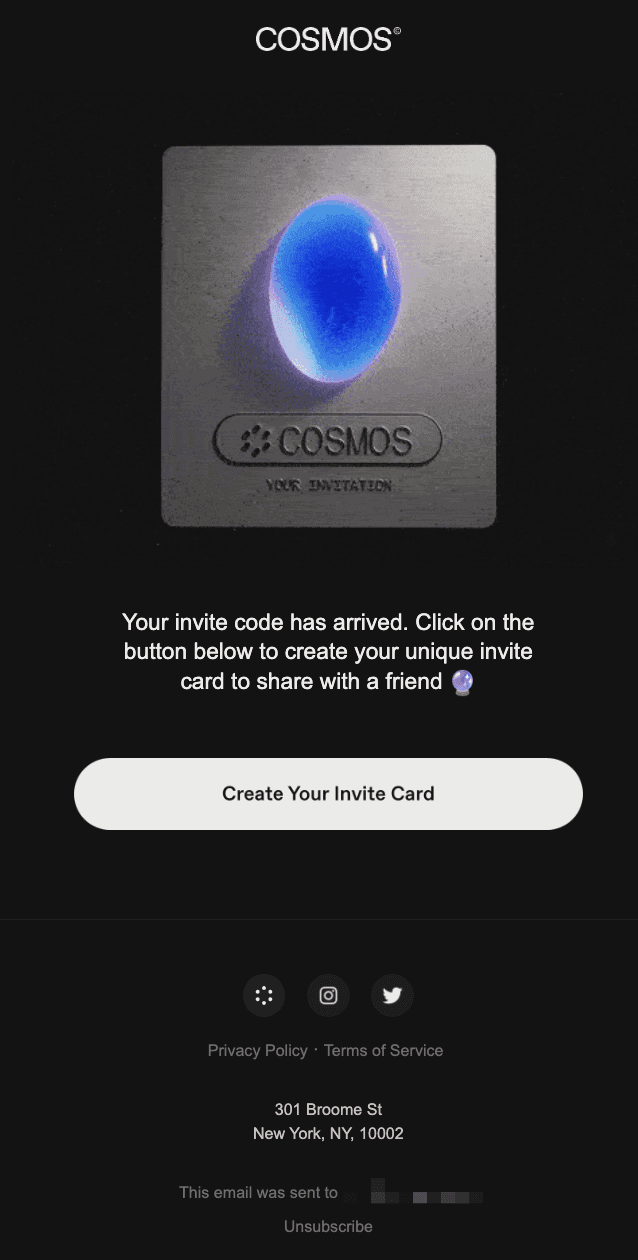
These public examples show what “one job per email” looks like in practice.
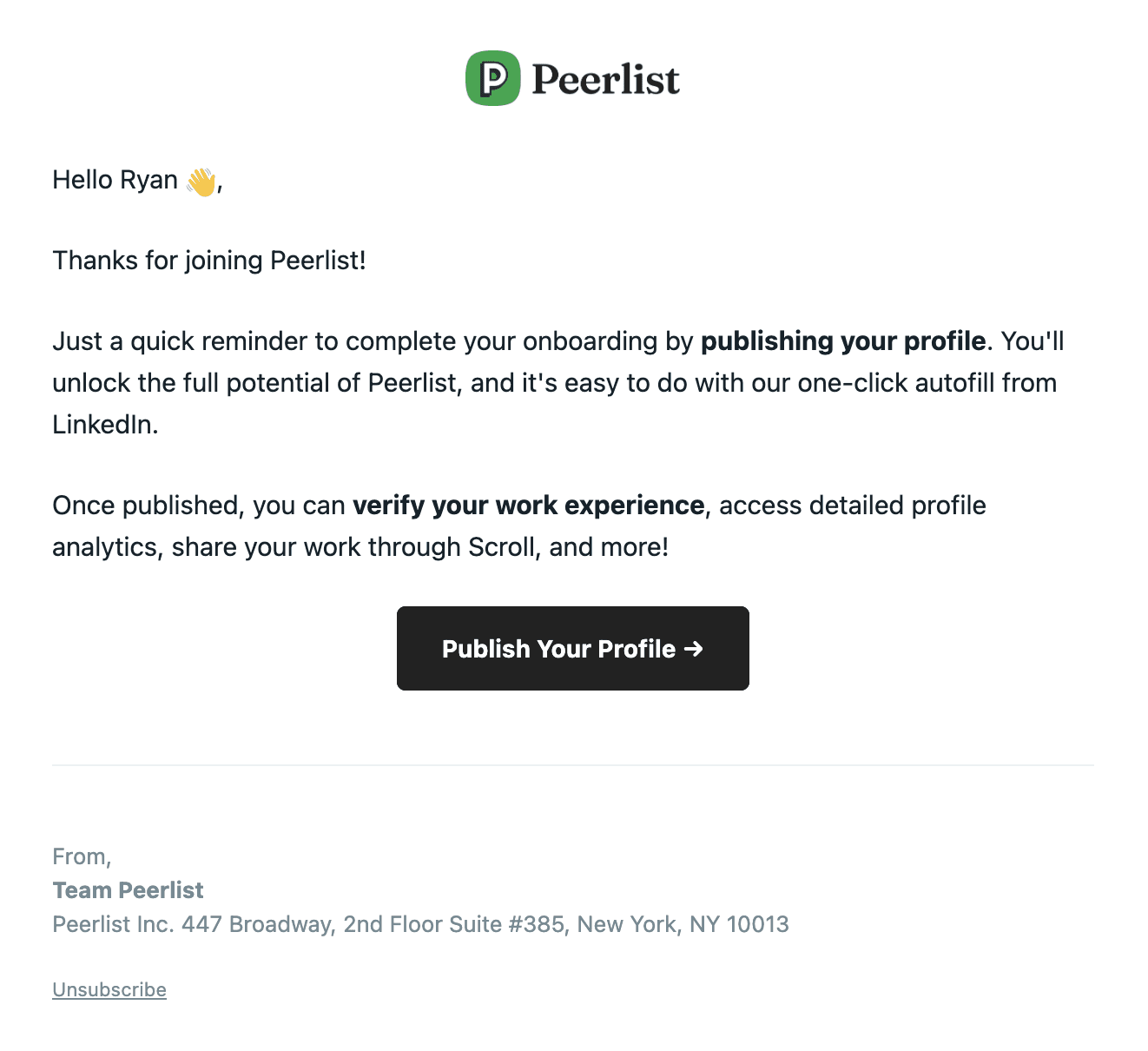
Peerlist names the unfinished step in the subject line and makes publishing the profile the message's main job. Source: Loops' public onboarding email examples.
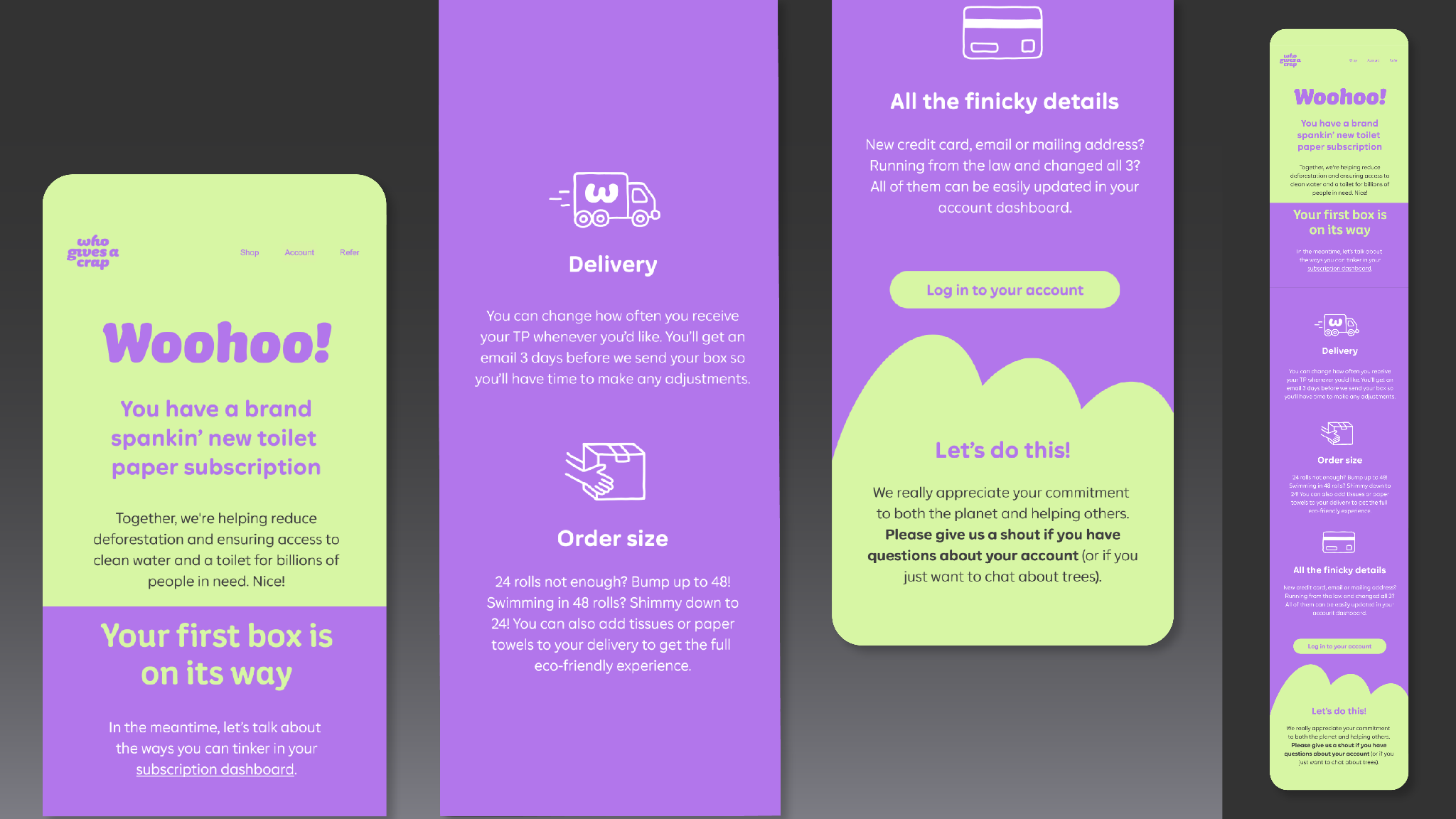
Who Gives a Crap combines first-order confirmation, account access, delivery expectations, and purpose-led brand messaging. Source: Shopify's onboarding-email guide.
What to look for in each example
A useful example should reveal four things: why the email was triggered at that moment, what state the customer is in, which action the message prioritizes, and where the click leads. Subject lines and preheaders matter, but the stronger lesson is whether the email gives the right customer a clear, credible, and useful next step.
How SaaS onboarding emails differ from ecommerce onboarding
SaaS onboarding emails usually move a new account toward a product activation event. Customer onboarding email sequences for ecommerce more often reduce post-purchase uncertainty, explain delivery or product use, and prepare the next relationship milestone.
Decision
B2B SaaS onboarding
B2C ecommerce or subscription onboarding
Starting trigger
Account, workspace, or trial created
Subscription, first order, or account created
First success
A meaningful product action
A confident purchase-to-use transition
Typical blocker
Integration, permissions, data, or an empty workspace
Delivery uncertainty, setup, sizing, care, or account access
Useful content
Direct product link, code sample, template, setup checklist
Order status, usage guide, account link, care instructions
Conversion moment
Trial-to-paid or expanded product use
Repeat purchase, subscription retention, or successful product use
Core measurement
Activation rate and time to activation
Delivery/use completion, support demand, retention, and repeat purchase
For SaaS onboarding emails, the most important design decision is the activation event. For ecommerce, the email often has to create confidence before it asks for another commercial action. Mixing those jobs can turn useful onboarding into an early upsell.
How the examples were selected
We chose each example for the decision it helps a marketer make. Every entry has a defined onboarding job, a visible next action, and an idea that can travel beyond the original brand.
Together, the examples cover first-session orientation, required setup, activation, collaboration, purchase confirmation, expansion, and re-engagement. Seeing those moments side by side makes it easier to plan a sequence instead of polishing one welcome email in isolation.
We reviewed more than 20 publicly available examples across official product blogs, lifecycle-marketing teardowns, and email inspiration libraries. We did not independently subscribe to every sequence. The 15 examples below were selected because each illustrates a distinct onboarding job, and the analysis is limited to what the public evidence supports.
15 onboarding email examples
1. Loom: lead with the fastest path to value
Best for: Video messaging, screenshot tools, recording products, and other products whose first action creates a visible artifact Stage: Right after signup Primary action: Record the first video
Loom's useful onboarding pattern is to focus the new user on recording, rather than explaining every way video messaging can be used. The action is small, observable, and closely tied to the product's core value.
What the example shows: A short product video acts as both the visual centerpiece and an example of the output. The primary CTA takes the user to the recording action rather than a general product page.
Try this: Identify the shortest action that produces a real artifact. Make that action the headline and CTA. If necessary, add one sentence explaining what the customer will have when the action is complete.
Check the dependency: Name every prerequisite before promising a fast result, especially installation, permissions, or data preparation.
2. Notion: remove the blank-page problem
Best for: Flexible products that can feel overwhelming at the beginning Stage: First session or early education Primary action: Open a relevant template
Notion's template-led onboarding pattern gives users a working starting point. That is more useful than describing a long list of capabilities because it replaces the question “What should I build?” with a concrete choice.
What the example shows: A visual set of template and use-case cards does most of the explaining, followed by a question that helps route the user toward a more relevant path.
A practical adaptation: Offer a small set of starting points based on the customer's job. A marketer might see a campaign brief, content calendar, and launch plan. A product team might see a roadmap, research repository, and meeting-notes template.
Keep the choice small: Keep the choice to a short, curated set so the template gallery solves the blank-page problem instead of recreating it.
3. Linear: teach the method, not only the interface
Best for: Products built around a distinctive workflow Stage: Early education Primary action: Create or organize the first issue
Linear is a useful example of method-led onboarding. A customer needs to understand more than where the buttons are; they need to understand how issues, projects, cycles, and team habits fit together.
What the example shows: A compact, plain-text-style welcome keeps the workspace link prominent and uses a named human sender rather than surrounding the first action with a full feature tour.
Put it into practice: Teach one operating principle and connect it to one product action. Explain why the step improves the customer's work, then link directly to the place where they can do it.
Keep the email short: Keep the explanation to a few short paragraphs and place the primary CTA within the first phone screen. Link to a guide when the method needs more room.
4. Slack: make collaboration part of activation
Best for: Products whose value increases when more people participate Stage: After the initial workspace is created Primary action: Invite teammates
A collaboration product cannot demonstrate its full value in an empty workspace. Slack's transferable lesson is to ask for the network-building action as soon as the account is ready for it.
What the example shows: Collaboration is framed as the practical next step, with the invitation action carrying more visual weight than secondary education.
For your own sequence: Explain what becomes possible after the invite: a real conversation, faster feedback, or a shared workflow. Reduce the work by providing an invitation link or simple import path.
Earn the invitation: Show what colleagues will see before asking for invitations. That context makes the request feel safe and purposeful.
5. Canva: personalize the lesson by intended use
Best for: Broad platforms serving many roles and outcomes Stage: After the customer identifies an interest or use case Primary action: Start a relevant design
Canva illustrates why onboarding content should reflect intent. A teacher, social media manager, and small-business owner should not receive the same sequence if the product already knows what each person wants to create.
What the example shows: Several visual starting points offer controlled choice. The cards help the user identify an intended use while giving the sender a signal for later messages.
A useful adaptation: Use one reliable preference or behavior to select the next example. Recommend the relevant format, starting asset, or workflow rather than inserting the person's name into generic copy.
Ask only what you will use: Collect only the information that changes the next recommendation.
6. Grammarly: prioritize enabling setup
Best for: Products that need an installation, integration, or permission before they become useful Stage: Immediately after account creation Primary action: Install the browser extension or application
Grammarly's strongest onboarding lesson is sequencing. Feature education matters less if the product is not available where the customer writes.
What the example shows: The installation CTA is treated as the enabling action, with supporting copy explaining where Grammarly will appear and what becomes possible after setup.
Make it concrete: Explain the setup action, where the product will appear afterward, and how to confirm that installation worked. Use a direct CTA that opens the correct store or setup page for the customer's device.
Stop after completion: Once setup is complete, stop the installation reminders and move to the next relevant lesson.
7. Shopify: turn a complicated launch into a checklist
Best for: Products with several required setup tasks Stage: Between account creation and launch Primary action: Complete the next store-launch task
Shopify's onboarding pattern is useful because opening a store involves many dependencies: products, payments, delivery, policies, design, and checkout. A checklist makes progress visible and reduces the pressure to finish everything at once.
What the example shows: A short launch checklist breaks setup into recognizable tasks such as enabling payments and preparing the storefront, with help available for users who get stuck.
Apply the pattern: Show completed and remaining tasks, explain why the next task matters, and link directly to it. Order the checklist by dependency rather than by which feature the company wants to promote.
Show only the next step: Reserve the full checklist for the product. In email, show the blocked step or a short progress summary.
8. Figma: connect learning with a shared artifact
Best for: Collaborative creative and productivity tools Stage: After the customer creates a first file Primary action: Invite a collaborator or share the file
Figma's collaboration pattern works because the invitation relates to something tangible. Asking someone to join an empty account is abstract; asking them to comment on a real file has a clear purpose.
What the example shows: The message centers on sharing a real file, while the CTA opens the invitation step directly instead of sending the user through account settings.
For a collaborative product: Trigger the invitation email after an artifact exists. Name the benefit of collaboration and make permission settings understandable before the user shares.
Match the invitation to the role: Tailor the invitation to the collaborator’s role; editors, reviewers, clients, and observers need different context.
9. Calendly: move from configuration to a real outcome
Best for: Tools whose setup is only valuable after something is shared or published Stage: After availability and event settings are configured Primary action: Share the scheduling link
Calendly's transferable lesson is that configuration is not the finish line. The customer experiences value when another person successfully books time.
What the example shows: Setup confirmation leads into a practical distribution action—sharing the scheduling link—so the email moves from configuration toward a real booking.
Turn it into action: After confirming setup, ask the customer to use the output in a realistic context: add the link to an email, send it to one person, or place it on a booking page.
Measure the real outcome: Treat saved settings as a midpoint. When possible, measure the first meaningful external outcome.
10. Stripe: make technical requirements legible
Best for: Products with compliance, verification, or integration requirements Stage: During account activation Primary action: Complete the next required technical or business step
Stripe is a useful model for onboarding in which progress depends on information, code, or verification. The email must make the outstanding requirement understandable without hiding its importance.
What the example shows: Developer-oriented copy, a code or documentation-first structure, and direct access to test mode keep the email aligned with the recipient's immediate technical job.
Make the requirement obvious: Name the incomplete step, explain its effect, link to the exact destination, and distinguish required work from optional optimization. Where appropriate, send different instructions to business and technical owners.
Name the missing requirement: Name the exact missing requirement so the recipient knows what remains before opening the product.
11. Customer.io: adapt reminders to unfinished work
Best for: Multi-step setup flows Stage: After a customer starts but does not finish onboarding Primary action: Resume the specific incomplete step
Customer.io's onboarding examples demonstrate progressive reminders: the message can restate the remaining action without pretending the customer is starting again.
What the example shows: The unfinished setup action remains prominent while later reminders add targeted assistance instead of repeating the same generic welcome message.
Improve the follow-up: Save the customer's progress and reference the incomplete task. Keep the tone helpful, explain why the step matters, and provide a direct route back.
Change or end the reminder: After a repeated reminder fails, change the help offered, add documentation or support, and end the sequence when further contact adds no value.
12. Coda: start with a familiar job
Best for: Flexible workspaces that support many possible systems Stage: Use-case education Primary action: Open a template for a familiar task
Customer.io's published onboarding-email analysis includes a Coda message built around taking meeting notes and starting from a template. The lesson is strong: introduce a flexible platform through a job the customer already understands.
What the example shows: A use-case-led heading, explanatory graphics, and one primary CTA that opens the relevant template rather than a generic workspace.
Start with a familiar job: Choose a frequent, low-risk task and provide a usable starting document. Explain the result in the customer's language, then show how the product supports it.
Choose an easy first task: Pick a first task that is familiar and easy to finish, even if it showcases fewer features.
13. Poshmark: expand the journey after observing behavior
Best for: Marketplaces and products in which customers can adopt more than one role Stage: After meaningful initial activity Primary action: Try a related marketplace action
The same Customer.io analysis documents a Poshmark email that teaches buyers how to resell, or “re-posh,” items they previously purchased. The email expands the customer journey from an observed behavior instead of pushing an unrelated feature.
What the example shows: The email connects a known purchase to a second marketplace role, so the next action feels like a continuation of the customer's activity.
Expand from observed behavior: Look for a credible adjacent action. Explain how the customer's existing activity makes the next use case relevant, and show the smallest step required to try it.
Wait for the first success: Wait for evidence of success in the first use case before introducing an adjacent one.
14. Who Gives a Crap: set expectations after purchase
Best for: Ecommerce and subscription products Stage: Immediately after the first order Primary action: Review delivery, impact, or account information
Shopify's onboarding-email guide documents a Who Gives a Crap confirmation email sent after a customer's first order. Shopify's example shows the email welcoming the customer, reinforcing the purchase's ecological and humanitarian purpose, linking to account management, and providing a route for questions.
What the example shows: Recognizable brand colors and type, a practical account link, and purpose-led messaging that supports rather than replaces order information.
Keep the practical details visible: Confirm what happened, state what happens next, and make support easy to reach. Use the brand story only where it helps the customer understand or feel confident about the decision.
Protect the practical information: Keep delivery dates, account access, cancellation terms, and other practical details easy to find.
15. Duolingo: make re-engagement about progress
Best for: Habit-forming products Stage: After inactivity or when a streak is at risk Primary action: Resume the next lesson
Duolingo's familiar re-engagement pattern connects the message to a goal or streak the learner already values. The reason to return is progress, not simply the fact that the app misses the user.
What the example shows: A progress or streak cue carries the visual emphasis, while the return action stays small and specific: continue the next lesson rather than explore the whole product.
Reconnect to real progress: Reference a truthful progress signal and offer a small next action. Let the customer resume at the right point rather than returning them to a generic home screen.
Respect the customer: Use honest urgency, support the customer’s stated goal, and respect notification preferences.
How to build your own onboarding email sequence
1. Define the activation event
Write down the first observable action that strongly suggests the customer has experienced value. Examples include publishing a page, sending the first campaign, inviting a teammate to a real project, receiving a booking, or completing a first order.
Do not use “logged in” or “opened an email” as a substitute unless that action truly creates value. The activation event should describe progress in the customer's work.
2. Map the required steps before activation
List every step that must occur before activation, then remove optional education. For each remaining step, record the owner, common blocker, available behavior signal, and direct destination URL.
A simple map might look like this:
Stage
Customer state
Email job
Exit condition
Welcome
Account created
Confirm the goal and first step
First setup action started
Setup
Required information missing
Remove the specific blocker
Required setup completed
Activation
Ready to use the core workflow
Prompt one meaningful action
Activation event completed
Expansion
Core value experienced
Introduce collaboration or a second use case
Expansion action completed
Recovery
Progress stopped
Diagnose and offer a smaller next step
User resumes or sequence ends
3. Give every email one job
For each message, complete this sentence: “After reading this email, the customer should ___.” If the blank contains “and,” the message probably has more than one job.
Keep secondary links subordinate. A support link can remain available, but it should not compete visually with the primary action.
4. Match the CTA to the promised destination
“Complete your profile” should open the incomplete profile step. “Create your first project” should open a new project or the closest safe starting screen. Sending people to a generic dashboard or help-center homepage breaks the promise.
Test destinations for new accounts, returning sessions, mobile devices, expired links, and users who have already completed the step.
5. Add behavior rules before adding more emails
Calendar timing is a fallback. Use product events when they are trustworthy: completed setup, created an artifact, invited a teammate, reached a usage threshold, or became inactive.
Define suppression rules at the same time. A user who completes the requested action should leave that branch immediately. Transactional messages such as verification and security notices should remain distinct from promotional onboarding.
6. Measure progress beyond opens
Track delivery and click performance, but connect each email to its intended product event. Compare activation completion, time to activation, blocked-step completion, qualified replies, conversion, and unsubscribe or complaint signals.
An email with fewer clicks may still be more useful if it helps the right customers complete a difficult step. Review results by audience and onboarding state instead of blending every recipient into one average.
7. Test one onboarding email before scaling the sequence
Start with one email and one decision. Define its audience, trigger, single job, CTA destination, exit condition, and the product event that counts as success. Check the message with a small group of roughly 20 to 50 new users first to find broken links, confusing instructions, tracking gaps, and support questions; treat this as a usability check, not proof that one version performs better.
For a controlled comparison, keep the audience and trigger consistent, compare the proposed email with the current experience, and measure target-event completion, time to completion, exits, unsubscribes, and support contacts. Calculate the sample size from the current conversion rate and the minimum improvement worth detecting. Roll out broadly only after the result is reliable enough for the decision, or when the usability evidence identifies an obvious defect that should be fixed without waiting for an A/B test.
Design for email length and mobile reading
There is no universal ideal word count. The email is long enough when the customer understands the next action, why it matters, and what will happen after the click. A simple welcome may need only a few lines; a technical setup email may need a short checklist, code sample, or annotated image.
Put the primary promise and CTA within the first mobile screen whenever the task allows it. Use one-column layouts, readable type, buttons that are easy to tap, and images that still make sense when scaled down or blocked. Do not rely on a fixed text-to-image ratio as a deliverability rule. Use enough live text to communicate the task accessibly, add alt text for meaningful images, and test the final HTML in major mobile clients before sending.
Where Tomako fits
Once you have examples, the hard part is turning them into a sequence your team can review and ship. Tomako can hold the activation definition, source evidence, trigger map, briefs, review decisions, and follow-up actions in one working context.
A practical handoff could be:
Record the activation event and audience segment.
Add the approved examples and the lesson taken from each one.
Draft a brief for every email: trigger, customer state, one job, CTA destination, exit condition, and reviewer.
Review copy against the same checklist before implementation.
Send the approved brief to the specialist email platform used for delivery, event triggers, consent, and suppression.
For example, a five-email onboarding sequence can keep the activation-event definition, trigger map, approved examples, CTA destinations, exit conditions, and review checklist in one Tomako workspace. The email platform then receives an approved execution plan instead of five disconnected drafts.
Copyable onboarding sequence brief
text
Sequence goal:
Activation event:
Audience and starting state:
Primary blocker:

Email 1 — Welcome
Trigger:
One job:
Subject line:
Preheader:
CTA and destination:
Exit condition:

Email 2 — Setup
Trigger:
One job:
Subject line:
Preheader:
CTA and destination:
Exit condition:

Email 3 — Activation
Trigger:
One job:
Subject line:
Preheader:
CTA and destination:
Exit condition:

Email 4 — Expansion
Trigger:
One job:
Subject line:
Preheader:
CTA and destination:
Exit condition:

Email 5 — Recovery or conversion
Trigger:
One job:
Subject line:
Preheader:
CTA and destination:
Exit condition:

Review checklist:
- Does every email have one primary action?
- Does each CTA open the promised destination?
- Does completion suppress the remaining reminder?
- Are consent, unsubscribe, and transactional boundaries correct?
- Which product event proves that the email worked?
Place this brief in a Tomako workspace with the approved examples and customer evidence. One person can draft the sequence, another can verify product and compliance details, and the owner can approve the final trigger and exit logic before implementation.
New users rarely need a complete tour. Choose the next action and delay advanced capabilities until they become relevant.
Using time instead of behavior
A day-three email can be sensible, but it becomes annoying if the user already completed its request. Use product behavior when available and maintain fallback timing only where necessary.
Linking to a generic destination
The landing experience must fulfill the CTA. Deep-link to the task, preserve session context, and explain any prerequisite that prevents direct completion.
Confusing welcome, verification, and onboarding
These messages serve different purposes. Keep account verification dependable and direct. Use the welcome message to orient the customer. Use later onboarding emails to move them through meaningful actions.
Optimizing only for opens
Subject lines matter, but an open does not prove that onboarding worked. Tie each email to the product event or customer outcome it is meant to influence.
Ignoring the end of the sequence
Define what happens after success, prolonged inactivity, conversion, unsubscribe, or a support request. A sequence needs exit conditions as much as it needs entry triggers.
Frequently asked questions
What is an onboarding email?
An onboarding email is a message sent after signup, purchase, or account creation to help a new customer complete the next action that makes the product or service useful. A sequence may cover orientation, setup, activation, education, collaboration, conversion, or recovery.
What is the difference between a welcome email and an onboarding email?
A welcome email is usually the first message and confirms the relationship or account. An onboarding email guides the customer through a useful next step. The welcome email can be the first message in an onboarding sequence, but the two terms are not always interchangeable.
How many onboarding emails should be in a sequence?
Use as many messages as the required customer journey needs, and no more. A simple product may need three to five messages, while a product with technical setup, collaboration, or a trial may need more branches. The important rule is one clear job per email and an exit condition for every branch.
When should onboarding emails be sent?
Send the first message immediately when it confirms signup or provides the first step. Trigger later messages from meaningful behavior where possible. When behavior data is unavailable, use timing based on how long the step normally takes and stop reminders after completion.
What should the first onboarding email say?
Confirm what the customer signed up for, state the first useful action, explain the result of completing it, and link directly to that action. Include a clear route to support when setup can fail or raise questions.
How do I personalize onboarding emails?
Personalize the next step with information that changes the recommendation, such as role, use case, plan, completed actions, missing setup, or product behavior. A relevant instruction is more useful than inserting a first name into generic copy.
Which onboarding email metrics matter most?
Measure the event each email is designed to cause: setup completion, activation, invitation, first output, booking, purchase, or return. Also monitor delivery, clicks, replies, time to activation, conversion, unsubscribes, and complaints so that progress is not achieved at the expense of trust.
Final recommendation
The best onboarding email examples are useful because they clarify the next decision, not because they look impressive in a gallery. Start with your activation event, map the required steps, and give each message one measurable job. Then use behavior to move customers forward or stop messages they no longer need.
When the sequence involves several contributors, use Tomako to organize the evidence, brief, review criteria, and follow-up work, then implement the approved triggers and sends in your email platform. See how Tomako supports coordinated marketing workflows.
Ricky works across influencer marketing, SEO/GEO, and AI-enabled growth workflows, with experience in prompt engineering and development. Her focus goes beyond visibility: connecting research, content production, search presence, and execution into a workflow a team can actually use. On the Tomako Blog, she writes about reusable research methods, content and search strategy, and how AI can help teams move concrete growth work forward.
 Ricky
Ricky

 SEO/GEO
 Learning loop