The first page of an influencer search can feel productive: hundreds of creator profiles, polished audience charts, and enough filters to keep an analyst busy for an afternoon. The disappointment comes later, when only three of the first 25 results are current, relevant, contactable, and safe enough to approach.
That is why I do not judge an influencer search tool by database size alone. I judge it by the usable shortlist it produces from a real campaign brief—and by how much work remains before the first thoughtful outreach message can be sent.
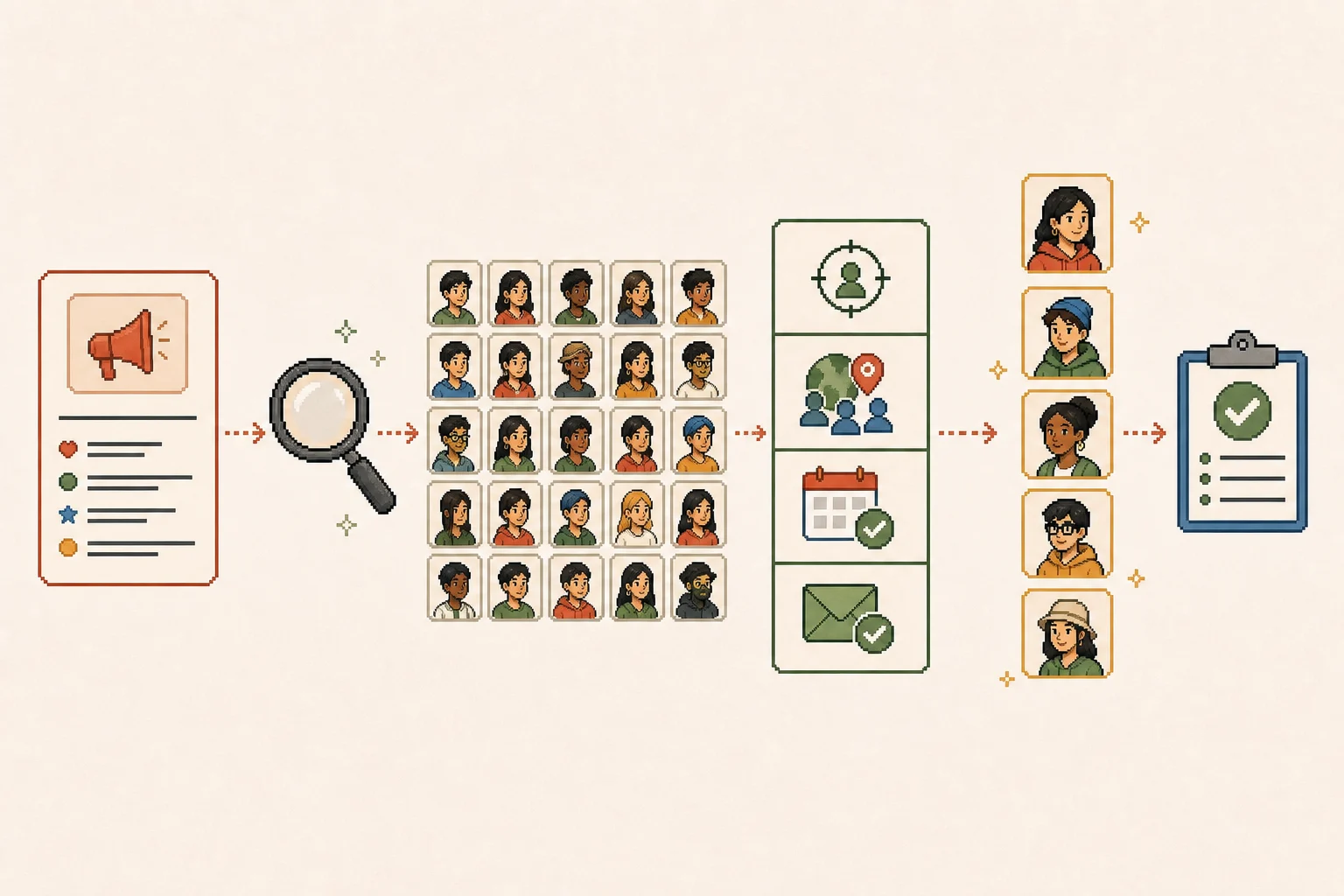
This guide gives you a practical way to compare free and paid search options, a 25-creator test you can run during a trial, and a four-layer filter for turning search results into a defensible shortlist.
Editorial method: Product capabilities and public pricing were checked on August 31, 2026. I did not test every paid plan under identical account conditions, and no vendor paid for inclusion. Database counts, prices, limits, and coverage can change; verify them in your own account and market.
Key takeaways
The best search tool is the one that produces the highest usable shortlist yield for your brief—not the biggest headline database.
Test the first 25 results with the same criteria before comparing demos or annual contracts.
Creator location and audience location are different filters; local campaigns often need both.
AI search can improve retrieval, but it does not replace recent-content review, audience checks, brand-safety judgment, or contact verification.
Free native search is often enough for a small first campaign; paid software earns its place when research becomes a repeated bottleneck.
Preserve the reason each creator made the shortlist so discovery can move into outreach without losing context.
Start here: six practical ways to find creators
If you opened this guide because you need names to contact, start with the table—not a theory section. The right route depends on whether you need fresh content, audience data, creators open to affiliate work, or a better way to move an existing lead into outreach.
Tool or route
Best for
How you actually find creators
How you move toward a partnership
Native Instagram, TikTok, or YouTube search
A first campaign or a fast niche check
Search customer problems, recurring content phrases, location terms, recent posts, and related accounts
Use a public business email or a specific DM that references one recent post
Shopify Collabs
Shopify brands recruiting affiliates
Invite known creators by email or review creator applications and connections
Add an accepted creator to a program, set the offer, send gifts or affiliate links, and track orders
Modash
Repeatable multi-platform sourcing
Start with platform + follower range + audience location, then add content or performance filters
Save qualified creators to a list, reveal available business contacts, and export or begin outreach
HypeAuditor
Audience-fit and risk-heavy searches
Set creator and audience geography separately, add keywords, then review content and audience-quality signals
Add approved creators to a list or network and use verified public contact routes
Sprout Social Influencer Marketing
Topic-led creator discovery inside a social team
Describe the topic creators should actually discuss, review matching content, then refine with filters
Shortlist the creator and continue into campaign activation, outreach, and approvals
Tomako
Teams that already see creator opportunities but lose the next step
Capture the KOC opportunity and the reason it matters
Turn it into a shortlist, prepare outreach material, assign contact and follow-up ToDos
My fast recommendation
First campaign: use native search. If Shopify is already your store and affiliate recruitment is the job, also test Shopify Collabs.
Repeated monthly sourcing: trial Modash or HypeAuditor with the same campaign brief and the same 25-result sample.
Discovery is not the bottleneck: if names already exist but nobody owns follow-up, use Tomako to preserve the opportunity, message angle, owner, and next action.
How to find creators in each tool
1. Native search: free, fresh, and manual
Do not begin with “fashion influencer” or another broad category. Start with the language a buyer or creator would use in a useful post.
For a cookware launch, I would run this sequence:
Search the problem: weeknight meals for one, small apartment cooking, and 15-minute meal prep.
Open recent posts and save creators who have repeated the topic—not one accidental viral post.
Open related accounts, commenters with credible expertise, and creators tagged by customers.
Search direct and adjacent competitors in Meta's branded-content library to see who has disclosed prior partnerships.
Check the last 10 to 15 posts for format, consistency, sponsored-content quality, audience conversation, and recent competitor conflicts.
Record the public business email, management link, or an approved DM route.
Why a creator is good: they repeatedly solve the audience problem, can produce the format you need, and receive relevant comments—not merely a high engagement percentage.
How to approach: mention one specific recent post, explain the audience overlap, propose one concrete deliverable, and ask whether they are open to discussing timing, fee, rights, and success criteria. Avoid “We love your content” messages with no campaign detail.
Best for: first campaigns and narrow communities. Watch-out: native search is current but hard to normalize or export.
2. Shopify Collabs: recruit creators into an affiliate program
Shopify Collabs is useful when the partnership itself is affiliate- or product-led and Shopify already owns the commerce record. The current Shopify help flow supports direct invitations and creator applications; creator availability and eligibility can vary.
Use it this way:
Define the program first: eligible products, commission, discount, gifting, geography, and approval requirements.
In Collabs, invite a creator you already trust by email, or review applicants/connections against the brief.
Open the creator profile and check application details, social accounts, collaboration history, existing offers, gifting history, and sales performance when available.
Accept the right creator into the relevant program instead of putting everyone into one generic offer.
Send the affiliate link or code and document the content, disclosure, rights, and reporting expectations outside the performance dashboard.
Why a creator is good: product affinity and willingness to work commercially are visible earlier than in cold native search.
How to partner: make the commission and gifting terms explicit, but do not treat an affiliate link as the whole agreement. Confirm deliverables, disclosure, content usage, payment conditions, and what happens if the product is unavailable.
Best for: eligible Shopify merchants with affiliate programs. Watch-out: Collabs is not a universal cross-platform audience-audit tool.
3. Modash: build a filtered cross-platform shortlist
Modash's official help center recommends starting with a few strong filters rather than stacking everything at once. Its current discovery workflow covers Instagram, TikTok, and YouTube and separates creator attributes from audience attributes.
My search sequence would be:
Pick one platform and a realistic follower range.
Set audience location, not only creator location. Add a minimum audience share only when the campaign genuinely needs it.
Add one content signal: bio keyword, hashtag used, topic, mention, or a natural-language/image search for the creative style.
Add one quality or activity signal: last-post date, average views, growth, or engagement.
Review the first results before narrowing again. If nothing survives, remove one filter at a time rather than changing the brief.
Open the detailed profile, inspect recent posts and audience breakdowns, then save qualified creators to a named campaign list.
Reveal a public contact where available and export only after the shortlist has a reason and proposed angle.
Why a creator is good: the creator's content fits the brief and the estimated audience plausibly overlaps the target market. Neither filter is enough alone.
How to partner: use the saved evidence to personalize outreach. The first message should reference the creator's content, explain the campaign job, and state whether the initial ask is a paid post, UGC license, gifting test, or affiliate collaboration.
Best for: ecommerce and agency teams doing repeated multi-platform research. Watch-out: credits, contacts, seats, and profile limits should be tested against real usage; pricing changes, so confirm it on the official pricing page.
4. HypeAuditor: narrow by audience fit and inspect risk
HypeAuditor's official documentation describes 35+ discovery filters and makes an important distinction between creator location and audience location.
Use it in this order:
Choose the network and creator type.
Add creator location only if where the creator lives matters to production or local credibility.
Add audience country, city, age, gender, language, or interest criteria that reflect the buyer—not the creator.
Add a keyword or specific natural-language request when a broad category is not precise enough.
Temporarily remove secondary filters if the results look strange; then restore one condition at a time.
Review recent content in gallery view before relying on audience-quality or account-quality scores.
Save a successful filter combination for the next market, changing only the location or campaign-specific requirement.
Why a creator is good: the audience estimate, recent content, and commercial fit point in the same direction. A single authenticity score should trigger review, never act as a verdict.
How to partner: save the evidence that supports the decision, verify a legitimate business contact, and ask for first-party audience or campaign screenshots later if the fee and risk justify deeper diligence.
Best for: regulated, high-fee, or audience-risk-sensitive campaigns. Watch-out: the full product and price require procurement review; confirm current terms directly.
5. Sprout Social: search by what creators talk about
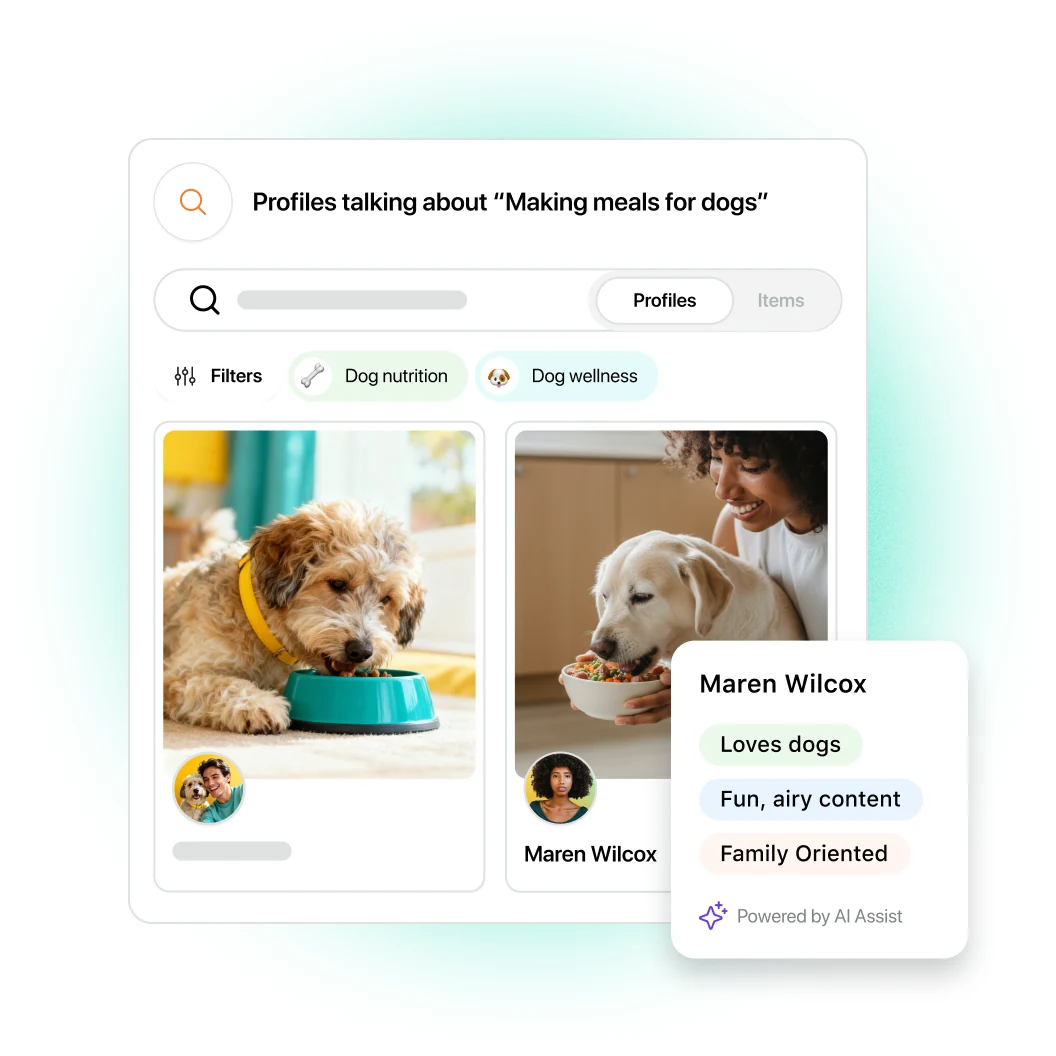
Sprout Social's public creator-discovery page shows topic-led semantic search. Instead of predicting the right hashtag, you describe the subject or content behavior you want, then review matching creators and posts.
The practical workflow is:
Write a specific topical prompt such as registered dietitians making budget-friendly high-protein vegetarian meals.
Review the matching content before the profile summary. Reject creators whose match comes from one isolated post.
Check “Topics They Talk About” and Brand Fit signals as navigation aids, then read the underlying posts yourself.
Refine with follower, location, language, demographic, or activity filters only after topical relevance looks right.
Add the creator to a campaign shortlist and preserve the posts that explain the fit.
Continue into proposal, outreach, contract, content review, and approval workflows if those modules fit your team.
Source: Sprout Social's official creator-discovery page, reviewed September 1, 2026. This is vendor product imagery and demonstrates the search interface; it does not independently prove match quality.
Why a creator is good: their recent body of work—not just their bio—shows credible, repeatable topic alignment.
How to partner: carry the matching posts into the brief so the creator understands why they were selected. Then align deliverables, creative freedom, rights, review rounds, timing, fee, and measurement before signing.
Best for: established social teams that want topic-led discovery connected to campaign operations. Watch-out: pricing is not publicly disclosed; request a demo and test the normal workflow, not a polished sample query.
6. Tomako: turn a creator lead into owned follow-up
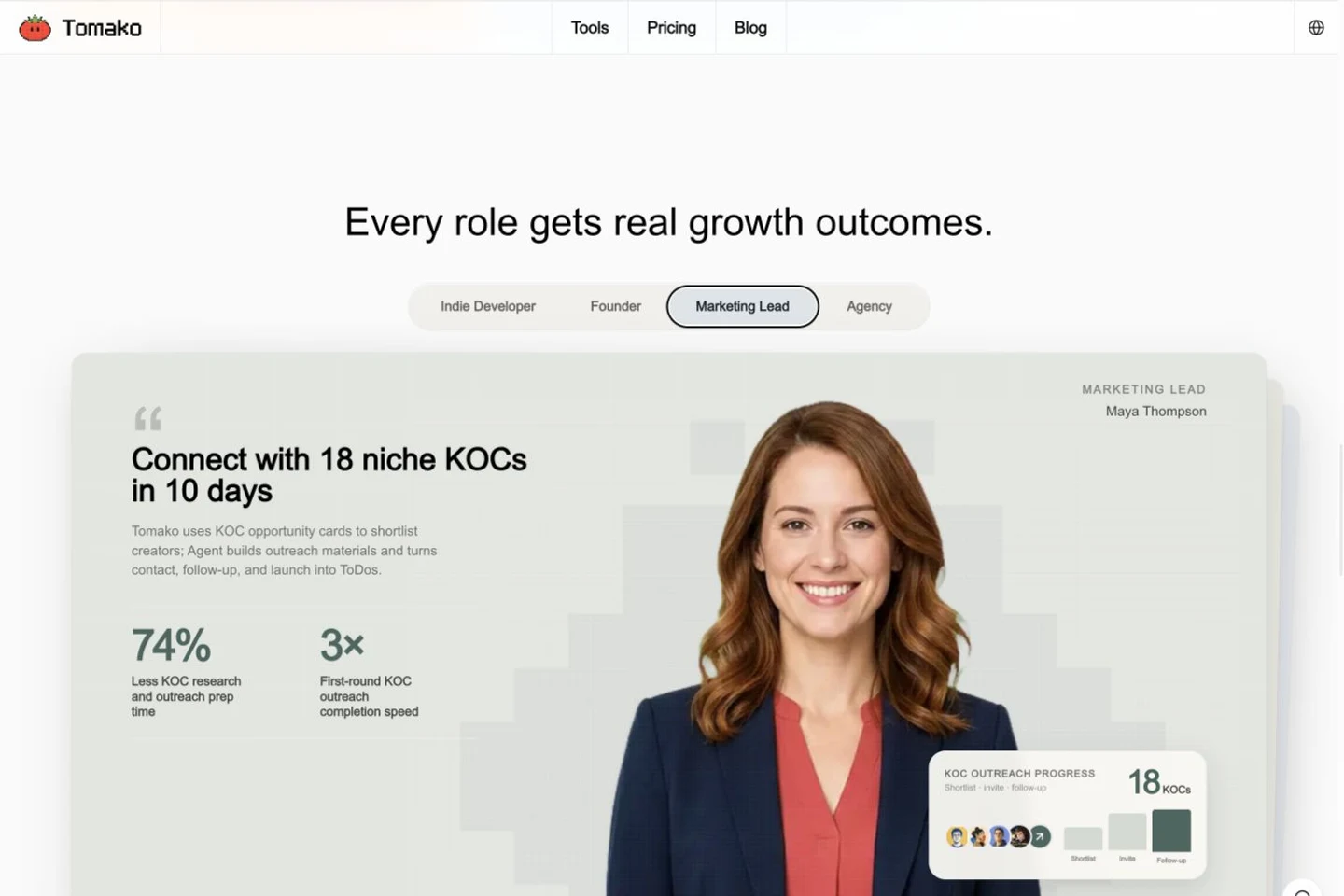
Tomako solves a different job. I would not present it as a replacement for a broad creator database or an independent audience-quality audit. Its public product flow shows KOC opportunity cards moving into shortlists, outreach materials, and contact, follow-up, and launch ToDos.
Use it after discovery:
Capture the creator opportunity and the campaign it may support.
Save the exact reason the creator fits, evidence links, concerns, and suggested collaboration angle.
Move approved names into a shortlist.
Prepare outreach material using that context rather than writing a generic pitch from scratch.
Assign contact, response, negotiation, product delivery, and follow-up as owned ToDos.
Source: Tomako's public product page, reviewed September 1, 2026. The image demonstrates the intended KOC workflow; example identities and performance figures are product-demo content, not independently audited campaign results.
Why a creator is good: the decision record explains the match instead of reducing it to a handle and follower count.
How to partner: the research owner hands the collaboration angle, evidence, concern, owner, and next action to the outreach owner without recreating the work.
Best for: lean teams whose problem is follow-through after discovery. Watch-out: Tomako's public pages do not claim a specialist database size, fake-follower score, or creator-level commerce attribution system.
Compare tools by shortlist quality, not profile count
An influencer search tool has to do three jobs well:
Turn a campaign brief into a relevant creator pool.
Show enough evidence to reject weak matches quickly.
Save approved candidates in a form the outreach owner can use immediately.
The simplest metric I use is:
Usable shortlist yield = creators you would genuinely contact ÷ profiles reviewed × 100
If I review 25 results and would contact five, the yield is 20%. A second platform may return 10,000 more profiles, but if only two of its first 25 pass review, the larger database has not saved my team time.
This is not a universal product score. Yield changes with the brief, market, platform, creator tier, and reviewer. Its value is comparability: give every option the same job, reviewer, sample size, and stop rule.
Which route should you take?
First campaign: begin with free native search. If Shopify already runs your commerce workflow and affiliate recruitment is part of the brief, evaluate Shopify Collabs against the same criteria.
Roughly 20 or more creator reviews per month: trial a specialist option such as Modash or HypeAuditor, then run the 25-creator test below. Twenty is a workload trigger for the team, not an industry benchmark.
The four-layer filter I use before a creator reaches outreach
A search result is not a recommendation. I move every candidate through four layers.
Layer 1: brief relevance
Ask whether the creator fits the actual campaign job:
Audience problem and product category.
Market, language, and cultural context.
Platform and content format.
Creator tier and expected role: reach, UGC, education, conversion, authority, or local activation.
Exclusions such as recent competitor work or incompatible claims.
If the brief cannot produce a clear yes/no at this layer, fix the brief before adding filters.
Layer 2: audience plausibility
Creator location is not audience location. A London creator can have a US-heavy following; a New York creator can have a global audience that is wrong for a local launch.
Use tool estimates when available, then look for corroboration in comments, language, topics, event references, posting times, and first-party screenshots later in the process. For high-cost partnerships, follow the deeper checks in how to spot fake influencers.
Layer 3: content freshness and fit
Review enough recent posts to understand the creator's current work—not the bio written two years ago. I look for:
Consistent relevance over the last 30 to 90 days.
Formats the campaign actually needs.
Evidence that sponsored content still sounds like the creator.
Comment quality and community response.
Recent competitor partnerships, disclosure habits, and brand-safety concerns.
An engagement rate cannot tell you whether the creator explains a complex product clearly or whether every second post is a promotion.
Layer 4: contactability and handoff
A qualified creator with no usable contact path is not outreach-ready. Record the public business email, management route, marketplace contact, or approved direct-message path—without collecting private personal data.
Then preserve why the person passed. The outreach owner should see the brief fit, evidence, concern, proposed angle, owner, and next action. A CSV containing only handles and follower counts forces the team to repeat the research.
Use a scorecard you can complete in three minutes
Do not begin with universal engagement-rate cutoffs. Benchmarks vary by platform, format, follower tier, market, and measurement method. Begin with evidence tied to the campaign.
Check
Pass when
Fail or review when
What to record
Brief fit
Recent content repeatedly addresses the target problem
The match appears only in the bio or one old post
Two relevant post links and one-sentence rationale
Audience fit
Tool estimate and visible community signals support the target market
Creator location is being used as a substitute for audience location
Estimated target share, data date, and corroborating signals
Content quality
The creator can deliver the required format with a credible voice
Sponsored posts feel disconnected, unclear, or over-scripted
Best format example and one creative risk
Activity
Relevant posting is recent enough for the campaign
The account or topic has gone quiet
Date of newest relevant post
Commercial fit
Prior partnerships are disclosed and do not create an obvious conflict
Recent competitor exclusivity, excessive ad density, or missing disclosure
Recent partner examples and conflict note
Contactability
A public business email, manager, marketplace route, or approved DM exists
Only private personal information or an unverified scraped address is available
Contact route, owner, and first follow-up date
Set numeric thresholds only where the brief requires them. A city launch may need a minimum audience share in one location; a UGC-only brief may care more about creative execution than follower geography. Record the threshold before searching so it cannot be changed to rescue a favorite profile.
From a good creator to an agreed collaboration
Finding a creator is only the first half of the job. I use this five-step handoff:
Write the reason to contact. One sentence should connect a recent post, the target audience, and the campaign job.
Choose the right offer. Decide whether this is paid sponsorship, UGC production, gifting, affiliate work, an event, or a longer ambassador relationship.
Send a specific first message. State why you chose them, the product and audience, the expected format, timing, and whether budget is available. Ask for interest and rates rather than demanding a full proposal.
Confirm the commercial terms. Agree deliverables, review rounds, deadlines, disclosure, usage rights, exclusivity, fee, payment schedule, cancellation, and success measures.
Turn the agreement into owned work. Assign product delivery, briefing, approvals, posting, tracking, payment, and follow-up. Do not leave the agreement buried in a DM thread.
For detailed language and rights questions, use the guide to negotiating with influencers. The search record should travel with the negotiation so the creator is not asked to repeat information the team already reviewed.
Run the 25-creator test before you buy
The trial should answer one question: does this tool reduce the cost of producing an outreach-ready shortlist for work you actually run?
No time for the full test? Run the 10-result version.
In the first 10 results, how many creators would you genuinely contact?
How many have a usable, legitimate contact route?
How many manual steps does it take to move from a search result to a ready outreach draft?
Use the same brief and reviewer for every option. The quick version will not diagnose every failure, but it exposes whether a tool improves the first shortlist or merely gives you more profiles to inspect.
Step 1: freeze one real brief
Use the same 150-to-250-word brief for every option. Include:
Product and target customer.
Campaign objective and required content format.
Platform, market, language, and timing.
Preferred creator tier and budget reality.
Audience requirements and exclusions.
Three examples of suitable content—not just famous creators.
Do not let each vendor replace your brief with its best demo category.
Step 2: define pass/fail before searching
Create four binary gates that match the layers above. For example:
Current content clearly matches the buyer problem.
Creator and audience geography are plausible for the campaign.
Recent work passes basic quality, safety, and disclosure review.
A legitimate business contact or approved outreach route exists.
A candidate enters the usable shortlist only after passing all four. You can record softer scores as notes, but do not change the gates halfway through because one tool produces attractive profiles.
Step 3: review the first 25 results
Use the normal ranking and the filters you would use in production. Do not cherry-pick from page 12 to improve the result.
Record for each profile:
Pass or fail at each gate.
Time spent reviewing.
Missing or contradictory data.
Date of the newest relevant post.
Contact route.
One sentence explaining the decision.
Stop at 25. A fixed sample prevents one trial from getting more patience than another.
Time to five: minutes required to identify five people you would approach.
False-positive burden: results that looked suitable in search but failed manual review.
Evidence completeness: shortlisted profiles with enough evidence to explain the choice.
Handoff readiness: shortlisted profiles that can move to outreach without rebuilding the record.
If a tool saves 90 minutes but produces a shortlist nobody trusts, it did not save 90 minutes. It moved the work downstream.
Step 5: model the real annual cost
The subscription is only one line. Include:
Annual or monthly contract terms.
Seats and permission levels.
Opened-profile, report, search, export, and contact credits.
Additional markets or social networks.
Onboarding and service fees.
CRM, email, affiliate, or ecommerce integrations.
Staff time for review, cleanup, export, and handoff.
Then compare the cost with the current bottleneck. If your team runs one small campaign each quarter, native search plus a disciplined record may win. If two people spend 30 hours every month sourcing across markets, paid discovery can be easy to justify.
How AI changes creator search—and where it should stop
AI is strongest at retrieval and preparation. It can turn a natural-language brief into queries, find semantic content matches, expand a strong seed creator into lookalikes, summarize recent posts, highlight missing fields, and draft the reason a candidate may fit.
Keep human approval for:
Audience and cultural fit.
Brand safety and reputational risk.
Medical, financial, environmental, or other sensitive claims.
Creative quality and product credibility.
Competitor conflicts and partnership fatigue.
Contact choice, offer, fees, rights, and final outreach.
The practical rule is: let AI reduce the pile; do not let it silently decide who represents the brand.
Common influencer-search mistakes
Starting with filters before the campaign job
“Beauty, US, 10K–100K followers” is not a useful brief. A tutorial creator, dermatologist, deal account, makeup artist, and lifestyle vlogger can all match those filters while solving different jobs.
Using broad hashtags as the whole search strategy
Large hashtags favor already-visible creators and generic content. Search recurring audience problems, local phrases, product use cases, adjacent interests, and customer language.
Trusting one proprietary score
Scores compress assumptions. Use them to prioritize inspection, then review the underlying content and evidence. Never turn a low score into a public accusation.
Ignoring data freshness
Check the newest relevant post, recent engagement pattern, current location signals, and whether the contact route still works. Ask paid vendors how frequently each data type refreshes; “database updated daily” may not mean every profile field is refreshed daily.
Buying a database when the real problem is outreach
If the team already has 500 names but sends generic messages, waits a week for approval, or cannot explain the offer, another search product will add inventory—not progress. Use our influencer marketing tools guide to map the whole workflow.
Losing the reason behind the shortlist
A handle is not a decision record. Save the campaign fit, evidence, concern, proposed angle, owner, and next step. Those notes improve outreach and make the eventual influencer marketing ROI review easier to defend.
Frequently asked questions
What is an influencer search tool?
An influencer search tool helps a brand find and filter creators using signals such as topic, platform, location, audience, follower range, engagement, recent content, or contact availability. Some tools stop at discovery; others also support vetting, lists, outreach, campaign management, or measurement.
What is the best free influencer search tool?
For a small first campaign, the best free starting point is usually native platform search combined with customer mentions, competitor partnership research, and a structured spreadsheet. Meta's branded-content search and creator marketplace can also help in supported markets. Paid software becomes useful when repeated manual research costs more than the subscription.
How do I search for micro-influencers?
Start with a precise brief, then search niche topics, recurring content phrases, customer communities, local terms, and adjacent creators rather than only broad hashtags. Set a follower range only after defining the campaign job, and manually review recent posts and audience fit before outreach.
Can I find influencers by location?
Many paid tools provide creator-location and audience-location filters, but the two are not interchangeable. A creator may live in your target city while most followers live elsewhere. For local campaigns, verify both signals and inspect recent location-specific content.
How accurate are influencer search tools?
Accuracy varies by network, market, data refresh schedule, and filter. Treat every result as a candidate, not a verified recommendation. Test the first 25 results from the same brief, confirm recent content and contactability, and calculate the percentage you would genuinely approach.
Is an influencer database the same as an influencer search tool?
Not exactly. A database is the underlying collection of creator profiles and attributes. A search tool is the interface and ranking system used to retrieve candidates from that data. A large database can still produce a weak shortlist if coverage is stale, filters are poor, or ranking does not match your brief. For a procurement-focused audit, read how to choose an influencer database.
Choose the tool that produces the next decision
If you remember one thing
Freeze one real brief.
Review the first 25 results.
Buy for usable shortlist yield and handoff readiness—not database size.
The right influencer search tool does not merely return more creators. It helps your team find people who fit the campaign, reject weak matches with evidence, preserve the reason behind the shortlist, and move the right candidates into thoughtful outreach.
If deep multi-platform data is the bottleneck, test a specialist database. If you are validating a first campaign, start with native search. If your team already sees creator opportunities but struggles to turn them into organized follow-up, see how Tomako connects KOC opportunities with action or compare current plans.
Ricky works across influencer marketing, SEO/GEO, and AI-enabled growth workflows, with experience in prompt engineering and development. Her focus goes beyond visibility: connecting research, content production, search presence, and execution into a workflow a team can actually use. On the Tomako Blog, she writes about reusable research methods, content and search strategy, and how AI can help teams move concrete growth work forward.
 Ricky
Ricky